

Every day millions of people upload their most sensitive documents to free online PDF tools — contracts, tax returns, medical records, bank statements, legal agreements. They drag and drop without a second thought because the tool looks professional and trustworthy.
But here is the question most people never ask: is it actually safe to upload PDFs to online tools?
The answer is more complicated than you might think — and in this guide we will break down exactly what happens to your files when you upload them, what the real risks are, and how to handle PDFs completely privately without uploading anything at all.

PDFStream — Free browser-based PDF tools. No uploads, 100% private.
What Actually Happens When You Upload a PDF Online
When you upload a PDF to an online PDF tool, here is what actually happens behind the scenes:
Your file travels from your device across the internet to a remote server — usually hosted on cloud storage infrastructure. The server then processes your document, performs the requested task (merging, splitting, compressing, converting), and makes the result available for download. Your original file and the processed version sit on that server for a period of time before being deleted.
The key word here is deleted — but when exactly? And by whom? And how securely?
Some services state they delete files within one to two hours of processing. However, as security researchers have noted, many services retain uploaded documents far beyond their stated retention periods — creating privacy risks that users never know about.
The alternative? Using a browser-based PDF tool like PDFStream that processes everything locally on your device — with zero uploads, zero servers and zero privacy risk. More on that shortly.
The Real Risks of Uploading PDFs Online
Let us be specific about what can go wrong when you upload PDFs to online tools:
Risk 1 — Data Breaches
Online services store your uploaded files on remote servers. If those servers are breached — which happens more often than companies admit — your sensitive documents could be exposed. Tax returns, legal contracts, medical records and corporate financial statements have all appeared in data breaches traced back to online document tools.
Risk 2 — Metadata Exposure
PDF documents contain hidden metadata — author information, editing history, creation timestamps, embedded comments and tracked changes. When you upload a PDF to an online tool, that metadata can be extracted and retained even after the file itself is supposedly deleted. For businesses this can expose internal plans, personnel information and strategic data.
Risk 3 — Man-in-the-Middle Attacks
Even when a service uses HTTPS encryption, sophisticated attackers can intercept document transmissions on public Wi-Fi networks. If you are uploading a sensitive contract from a coffee shop or airport, your file may be more exposed than you think.
Risk 4 — No Zero-Knowledge Guarantee
Most online PDF tools do not offer zero-knowledge architecture — meaning the platform itself can technically access your files during processing. Your documents pass through infrastructure you do not control and cannot audit.
Risk 5 — Malicious Downloads
Some less reputable online PDF tools are outright scams. When you download your processed file you may unknowingly receive malicious software alongside it. Because these files often do not trigger antivirus warnings, many users never realize what happened.
Which PDFs Are Most at Risk?
Not all PDF uploads carry the same risk. Here is a simple guide:
High risk — process locally, never upload: Tax documents, bank statements, medical records, legal contracts, HR documents, financial reports, anything containing passwords or personal identification numbers, confidential business plans.
Medium risk — upload with caution: Work presentations, internal reports, documents with personal email addresses or phone numbers, anything with company branding or internal labels.
Lower risk — generally acceptable to upload: Public documents, published articles, marketing materials with no sensitive data, documents you would share publicly anyway.
The Safer Alternative: Process PDFs in Your Browser With No Upload
The safest way to work with PDFs is using a tool that processes your files locally in your browser — meaning the entire operation happens on your own computer without your files ever leaving your device.
This is exactly what PDFStream does.
PDFStream is a completely free, browser-based PDF tool that lets you merge, split, compress and convert PDFs entirely in your browser. There are no uploads, no servers, no accounts and no fees. Your documents never leave your computer — making it the truly safe free alternative to upload-based PDF tools.
What Can You Do With PDFStream?
- Merge PDF files — combine multiple PDFs into one document
- Split PDF files — extract specific pages or split into separate files
- Compress PDFs — reduce file size without losing quality
- Convert PDFs — quickly and privately
- Remove pages — delete unwanted pages from any PDF
All of this happens locally in your browser with zero uploads — making PDFStream the safest free PDF tool available online.
How to Merge PDF Files Without Uploading (Step by Step)
Here is how to merge PDFs privately using PDFStream:
Step 1: Open PDFStream in Your Browser
Go to pdfstream.nzuki.com in any modern browser — Chrome, Edge, Firefox or Brave all work perfectly.
Step 2: Select Your PDF Files
Click the upload area or drag and drop your PDF files onto the page. You can add multiple files at once for merging. The files are loaded into your browser memory — they never leave your device.
Step 3: Arrange and Process
Arrange the files in the order you want them merged. Then click the Process button — the operation happens instantly inside your browser.
Step 4: Download Your Result
Click Download to save your merged PDF to your computer. The entire process is complete and your original files remain private on your device.
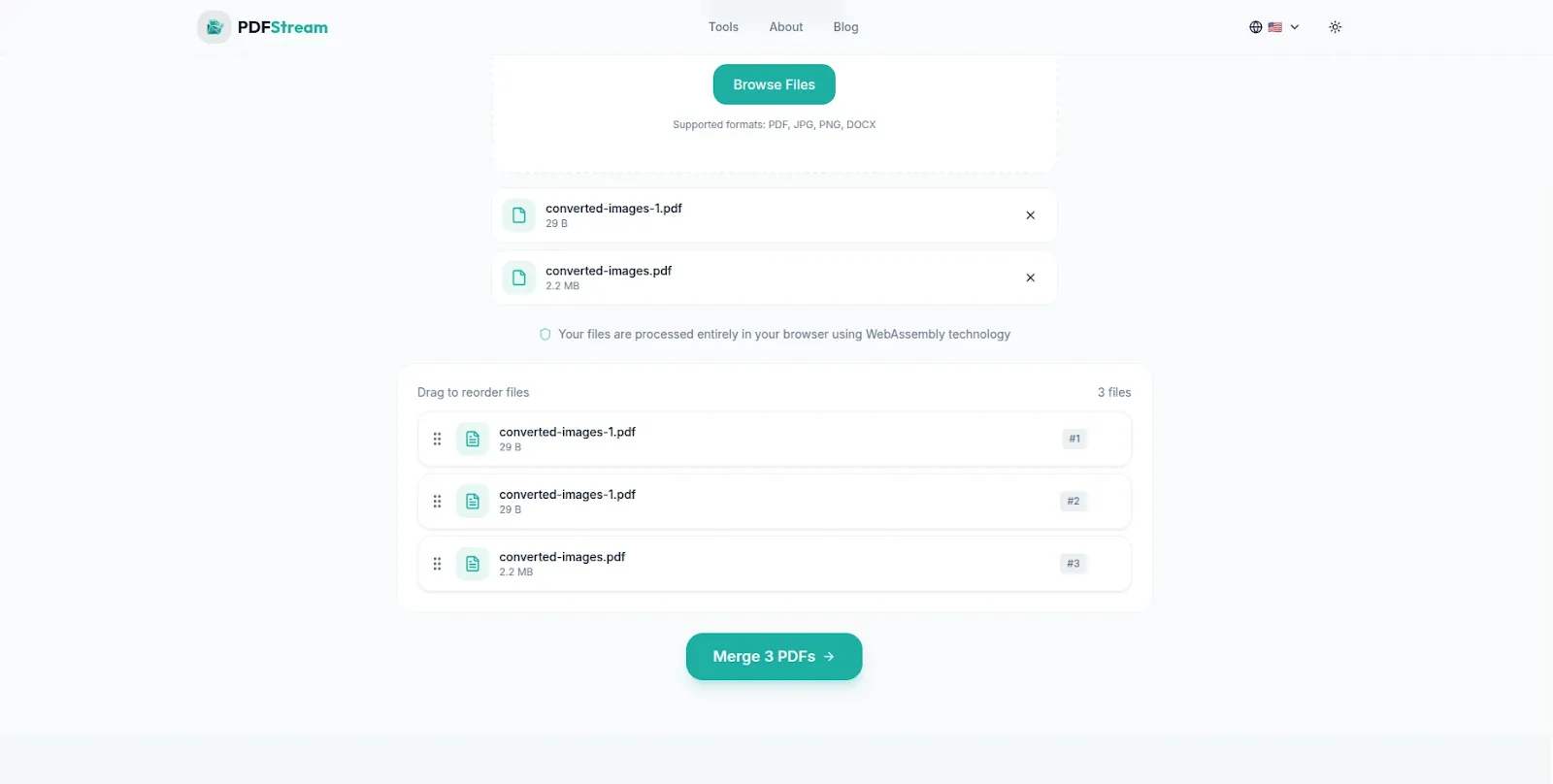
Download your merged PDF instantly — no waiting, no email, no account required.
No account. No waiting. No privacy risk. And best of all — completely free.
Frequently Asked Questions
Is it ever safe to upload PDFs online?
For non-sensitive public documents — it depends on the tool and their privacy policy. However for any document containing personal, financial, medical or confidential business information, you should avoid uploading entirely. Use a browser-based tool like PDFStream instead — it gives you all the same features with zero uploads.
How do I know if an online PDF tool is safe?
Look for HTTPS in the URL, a clear privacy policy that specifies file deletion timeframes, and GDPR compliance. Avoid any tool that does not clearly state what happens to your uploaded files. When in doubt, use a browser-based tool that requires no uploads at all.
Can online PDF tools see my document contents?
Technically yes — most online PDF tools process your document on their servers, which means the file contents pass through their infrastructure. Browser-based tools like PDFStream eliminate this concern entirely since processing happens on your own device.
Is PDFStream really free?
Yes — completely free. There are no hidden fees, no premium tiers and no account required. PDFStream is built and maintained by VelocityAI Solutions as a free tool for everyone.
Does PDFStream work on all browsers?
Yes. PDFStream works on any modern browser — Chrome, Edge, Firefox and Brave on Windows, macOS, Linux, Android and iOS are all supported.
What about HIPAA and GDPR compliance?
If you work in healthcare, legal or finance and handle regulated documents, browser-based tools are the safest option. Since PDFStream processes files locally with no uploads, there is no data transmission to third-party servers — eliminating the compliance risks that come with cloud-based PDF tools.
The Bottom Line
Uploading sensitive documents to online PDF tools carries real privacy risks — data breaches, metadata exposure, and no guarantee of secure deletion. For sensitive documents the safest choice is always a tool that never requires an upload in the first place.
PDFStream gives you a completely free alternative — merge, split, compress and convert PDFs entirely in your browser with zero uploads, zero accounts and zero privacy risk.
The next time you need to work with a PDF, skip the upload and go straight to pdfstream.nzuki.com — your documents stay exactly where they belong. On your device.
Also looking for a private image converter? Check out our guide on how to convert HEIC to JPG on Windows for free using SwiftPix — another browser-based tool with zero uploads.
🚀 Need a Professional Website or Custom Tool for Your Business?
VelocityAI Solutions builds AI-powered websites, mobile apps and business automation tools for businesses in Nairobi and beyond — at startup-friendly prices.
✅ Web Development | ✅ Mobile Apps | ✅ Business Automation | ✅ Cybersecurity
🌐 velocity-ai-solutions.nzuki.com
💬 WhatsApp: +254 735 644 100
📩 info.nzuki@gmail.com


0 Comments